LOCAL NETWORKS / DOCUMENTATION
Inherited an undocumented network: map it without disconnecting anything
When you inherit an undocumented network, opening a scanner and generating a diagram is tempting. I suggest starting with the information already available and establishing what it actually proves. An IP list is relatively easy to collect. The path between a workstation, a wall outlet, a switch port and a service needs separate evidence.
This is a fictional teaching office, not a client case study. Names, addresses, MAC addresses and table observations were created for the walkthrough. Commands were checked against documentation; shortened outputs are illustrative, not measurements from a production network.
What ‘without disconnecting anything’ means
I mean discovery without moving cables, rebooting equipment or changing configuration. Zero risk would be an unrealistic promise for unfamiliar hardware. Even polling creates load, and older printers or controllers may react poorly to scanning.
For the first pass, I restrict the work to reading existing tables and configuration through authorized accounts. Active discovery, enabling LLDP or SNMP, configuring port mirroring and cable testing are separate tasks. If verifying a connection requires an interruption, the diagram keeps a question mark until an agreed maintenance window.
Define the scope before accessing equipment: rooms, subnets, responsibility for phones, cameras, door controllers and contractor-managed devices. Record excluded areas and an incident contact. A documented gap is preferable to an unauthorized change.
Start with equipment, access and constraints
Identify the provider handoff, firewall or router, main switches, DNS and DHCP servers, hypervisors, wireless controller and monitoring system. Temporary names such as SW-01 and FW-01 are fine if they identify devices consistently.
Photograph the rack, patch panels and readable port numbers without moving cables. Record which cabinet and panel each photograph shows. Keep passwords, access QR codes and sensitive labels out of shared photographs.
Ask local staff about intermittent connectivity, devices used only occasionally and externally managed equipment. Record these answers as reports, not verified topology.
- Save available configuration using the supported method for the device and software version.
- Record the date, time, time zone and source of every export.
- Keep restricted original files separate from the working inventory.
- Record pre-existing faults so they are not mistaken for discovery-related incidents.
A configuration export may contain secrets. Store it securely rather than attaching it to a public diagram. An export alone does not demonstrate recoverability; that requires a separate restoration check.
Keep three views of the network
I separate physical connections, logical networking and service dependencies. Mixing cables, VLANs, addresses and application arrows on one sheet makes the result difficult to verify.
| View | Records | Example |
|---|---|---|
| Physical | Devices, ports, panels, outlets and cable runs | SW-02 Gi1/0/7 → PP-01/18 → B-214/02 |
| Logical | VLANs, subnets, gateways, routes and access zones | VLAN 20; 10.20.20.0/24; gateway 10.20.20.1 |
| Services | Service locations and dependencies | Clients obtain leases from DHCP-01 |
The teaching office has FW-01, managed switches SW-01 and SW-02, AP-01, workstation PC-07 and printer PRN-02. Initially, only names and some addresses are known. We will trace PC-07 and explicitly record what remains unknown about the printer.
One IP address is not one device. A server can have several interfaces, and an address can change owners. Use an inventory ID tied to serial numbers, interfaces and observations. A DNS name is useful for searching, but it is not sufficient identification.
DHCP provides a starting list
DHCP provides addresses, client identifiers, names, lease states and expiry times. I treat the export as observations. Static devices, another DHCP server and equipment that has been offline require other sources.
This Windows example reads active leases in one scope. It requires the DhcpServer module, authorized server access and an existing scope. Both the server name and subnet are fictional.
Get-DhcpServerv4Lease -ComputerName DHCP-01 -ScopeId 10.20.20.0 |
  Select-Object IPAddress, HostName, ClientId, AddressState, LeaseExpiryTime
Microsoft documents that the command returns active leases for the scope unless AllLeases is specified. Do not automatically treat ClientId as a MAC address: inspect its format and compare it with the client interface.
Our sample has PC-07 at 10.20.20.47 with ClientId 02-00-00-00-20-47. Record it as ‘DHCP snapshot T0’. It does not yet prove that the computer is online or attached to a particular port.
Also record scopes, exclusions, reservations and gateway/DNS options. A reservation does not prove that a device is actually using DHCP; check its local configuration.
Associate IP addresses with interfaces
For IPv4, ARP helps associate an address with a MAC; IPv6 uses the NDP neighbor table. Read this information on a device connected to the relevant segment, such as its gateway. A laptop's table does not contain every endpoint MAC beyond a router.
# Windows PowerShell: local IPv4 neighbor cache
Get-NetNeighbor -AddressFamily IPv4 |
  Select-Object InterfaceIndex, IPAddress, LinkLayerAddress, State

# Linux: local neighbor tables
ip -4 neigh show
ip -6 neigh show
Stale describes a cache state, not proof that the device is offline. A missing entry does not prove absence either. Avoid clearing tables or sending a network-wide ping sweep just to make the list look complete.
In the sample gateway snapshot, 10.20.20.47 maps to 02:00:00:00:20:47. Local settings on PC-07 confirm the same MAC for its wired interface. These observations now agree with DHCP.
Normalize punctuation and case for matching while retaining original values. If sources disagree, compare timestamps, VLANs, adapters, virtual interfaces and address reuse. A MAC vendor prefix is only a clue, especially with locally assigned or randomized addresses.
Field references: Get-NetNeighbor and ip-neighbour.
Follow the MAC through the switches
The forwarding database, or MAC table, shows the port through which a switch learned a MAC in a VLAN. This does not establish direct attachment. Another switch, access point, phone with a downstream PC port or hypervisor may sit behind that port.
These are read commands commonly used on Cisco IOS/IOS XE. Check syntax and availability for the actual platform first.
show mac address-table dynamic
show mac address-table address 0200.0000.2047
show interfaces status
show interfaces trunk
show vlan brief
show lldp neighbors detail
For a RouterOS bridge, start with /interface bridge host print and /ip neighbor print detail. Visibility and hardware switching behavior depend on the model and configuration; consult the MikroTik manual.
| Source | VLAN | Port | Supported conclusion |
|---|---|---|---|
| SW-01, T0 | 20 | Gi1/0/24 | The path toward the client uses this port |
| SW-02, T0 | 20 | Gi1/0/7 | On the next switch, the path uses port 7 |
| PC-07 adapter settings | Not established here | Wired adapter | The MAC belongs to the selected PC-07 interface |
First establish what SW-01 Gi1/0/24 connects to. If it is the SW-02 uplink, examining SW-02 is justified. If the neighbor is unknown, mark the connection accordingly.
Dynamic entries age out. For a quiet device, wait for normal activity and repeat the authorized read. An aggregated link may appear as Port-channel or bond, which does not identify an individual member cable. Several MACs on one port do not by themselves prove an unmanaged switch exists.
Check both ends of a neighbor relationship
LLDP advertises neighbor device and port identifiers. In our example, SW-01 reports SW-02 on local Gi1/0/24, with remote port Gi1/0/24. Check the reverse observation on SW-02 and compare chassis IDs, names and ports.
A System Name can be duplicated or outdated. Keep the original output, identifiers, both interfaces and observation time. For a switch stack, verify member numbering separately.
An empty neighbor list is not evidence of a missing cable. LLDP may be disabled, unsupported or affected by intervening equipment. Enabling it throughout the network is a configuration change, not part of this initial read-only pass.
RouterOS combines several discovery protocols; see Neighbor discovery. For Cisco, consult the platform-specific CDP, LLDP and MAC guide.
Even a consistent neighbor relationship does not describe the entire physical cable route. Patch panels and passive connections may be in between. Keep logical adjacency distinct from a verified cable run.
From switch port to wall outlet
A MAC table does not know that a cable passes through PP-01/18 and terminates at B-214/02. That information comes from inspection, labels, installation records and checks at the desk.
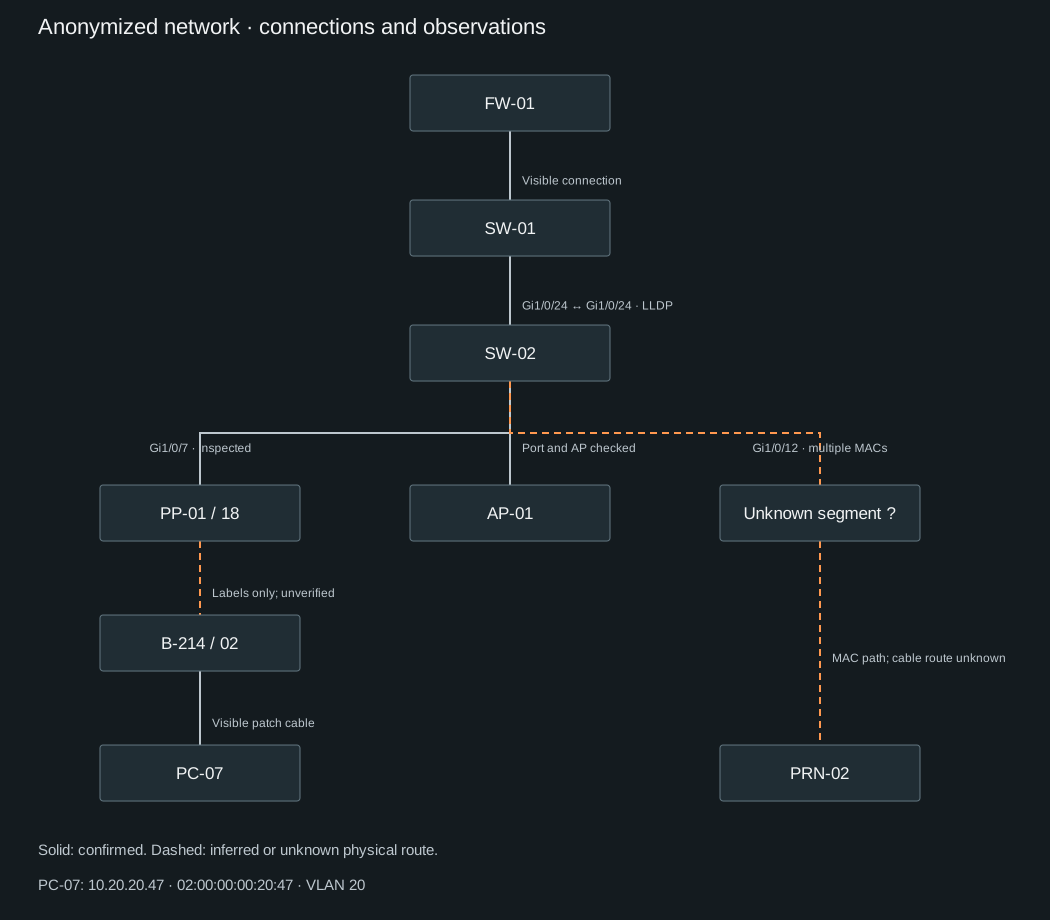
For PC-07, the adapter MAC is confirmed locally; SW-02 learns it on Gi1/0/7; the visible patch cord runs to PP-01/18. At the desk, PC-07 is connected to B-214/02. The panel label names that outlet, but the concealed cable run has not been verified.
Record PP-01/18 → B-214/02 as ‘inferred from labels’. Matching labels are useful evidence, but they do not establish cable continuity. A verified path and a plausible inference should not look identical.
Trace visible cables only when this can be done without pulling bundles or disturbing neighboring connections. Do not move fiber just to improve a photograph.
Use tone generators, testers and TDR according to the instrument and equipment instructions. Some tests interrupt links or affect PoE. If no suitable non-disruptive method is available, schedule the check. A dark port LED is not evidence that the port is unused; an endpoint may simply be off.
Record unknowns without inventing a topology
Suppose PRN-02 uses 10.20.20.60 and MAC 02:00:00:00:20:60. SW-02 learns it on Gi1/0/12 alongside several other MACs, with no LLDP neighbor. It is too early to label this as a switch under a desk.
Record: ‘Several MACs in VLAN 20 behind Gi1/0/12; intermediate equipment not identified.’ The next step is an authorized desk-side inspection and a conversation with the equipment owner. Until then, draw a dashed connection to an unknown segment.
| Status | Evidence | Drawing |
|---|---|---|
| Confirmed | A recorded check supports this precise claim | Solid line with evidence label |
| Inferred | Consistent indirect evidence; no direct check | Dashed line with explanation |
| Unknown | Insufficient or conflicting evidence | Dashed line, question mark and follow-up |
Status applies to a specific claim. You can confirm that a MAC is reachable through a port while the physical layout behind it remains unknown. The inventory includes a ‘What is established’ field for this reason.
Preserve conflicting observations with timestamps. Keep an old DNS name as a note rather than changing source data. A MAC moving between ports deserves investigation, not an arbitrary choice of the most convenient row.
Add VLANs, routing and wireless networks
For each VLAN, record its ID, purpose, subnet, gateway and routing device. Read configuration and compare it with clients. Do not infer VLAN IDs from subnet numbers.
For inter-switch links, record allowed VLANs, tagged/untagged behavior and native VLAN or PVID terminology as appropriate. Both ends may differ. Record inconsistencies for a separate change rather than fixing them during discovery.
For AP-01, document management addressing and its switch connection, then SSIDs and client network assignments. Client MAC visibility depends on local switching, controller tunneling and routing. Do not assume that every wireless client MAC will appear on the AP's physical port.
Routes and firewall rules describe intended paths and access constraints, not proof that an application works. Where service testing is in scope, perform an agreed normal operation and record its result separately.
Include IPv6 prefixes, routers, configuration mechanisms and neighbors. An IPv4-only inventory does not establish that no other network paths exist.
The first-pass diagram
The attached teaching diagram uses solid lines for scenario-confirmed adjacencies and visible patch connections. The concealed panel-to-outlet run is dashed. The printer branch includes an unknown segment, distinguishing a learned MAC path from a physical cable route.
Open the draw.io file in diagrams.net to replace sample labels with your own. An SVG preview is available without an editor. Status is expressed with line styles and labels, not color alone.
The first version does not have to fill every gap. It is useful when another administrator can locate core devices, see the boundary of verified information and continue the investigation.
An inventory another administrator can use
Download the empty CSV template and completed teaching example. They use UTF-8 and semicolons. When importing into Excel or LibreOffice, treat IPs, MACs and port identifiers as text. Each row represents an observation or connection segment, so a device can appear more than once.
Fields cover inventory ID, device, interface, IP, MAC, VLAN, neighbor and port, panel, outlet, status, established fact, evidence, time, investigator and next action. Replace T0 with an actual timestamp and time zone.
Do not store passwords or SNMP communities in the inventory. Review exports before sharing them with contractors and include only the required information.
A spreadsheet and editable diagram are a reasonable starting point for a small office. NetBox or another inventory system can come later. A larger platform cannot verify an incorrect connection or interpret an ambiguous label for you.
Article downloads
Open the .drawio file using File → Open in diagrams.net. Files contain fictional teaching data only.
A practical completion check
My acceptance criterion is straightforward: another administrator should be able to trace a selected workstation to its gateway, find the evidence behind each conclusion and recognize unresolved sections.
- Core equipment has consistent IDs; available configuration and original observations are stored.
- Connections have ports, status and evidence.
- The diagram agrees with the inventory; VLANs and subnets have a separate logical view.
- Unknowns have an owner and a specific next action.
- Responsible staff can access dated documents and know how to update them.
After a switch replacement, desk move or VLAN change, update the affected records. Retain the previous version and date the new one. The person making the change records what was checked afterward.
Start with one workstation. Trace its interface toward the gateway, record the evidence and mark the gaps. That path establishes the working standard for the rest of the network.